The fantasy version of working remotely from Japan goes like this: great coffee, fast internet, a window seat in Kyoto. The reality version includes a forty-minute detour trying to understand why your coworking space's billing portal won't accept your card - displayed in an interface that is fully, aggressively Japanese, with no English toggle anywhere. That's a small problem on its own. But small problems compound. Over a few weeks in a new country, you develop a kind of low-grade translation tax: the minutes and attention spent just trying to understand what an interface is asking before you can start doing the actual work.
The tools most people reach for - Google Translate's camera mode, browser extensions, copy-pasting into a translation tab - all work sometimes. But they all require you to stop, switch context, and run a separate operation for something that should take three seconds. Multiply that across every local app, every government notice, every landlord message on a platform that never considered international users, and the context switch becomes the real problem - not the language itself.

Where It Actually Gets Painful
Not all language friction is equal. Reading a menu is annoying but survivable. The situations that actually disrupt work are the ones where you're mid-task and suddenly hit a wall you weren't expecting.
🧾 Local invoicing and payment platforms
PayPay, Line Pay, and similar apps are built entirely for domestic users. Error messages, confirmation dialogs, account settings — none of it gets translated automatically, and the UI layouts don't map cleanly to what you'd expect from Western equivalents. Getting a transaction to go through when you're not sure which button is "confirm" and which is "cancel" is a particular kind of unpleasant.
🏠 Rental agreements and local property apps
In South Korea and Japan especially, rental listings and lease documents often exist on platforms with zero English support. You're signing something you've run through three different translation tools, none of which handled the layout well enough to be sure you got the right fields in the right order.
🔍 Competitive research in non-English markets
If you work in product, marketing, or strategy, some of your most valuable research is understanding what tools and services are popular in markets that don't report in English. Japanese SaaS, Korean e-commerce platforms, Chinese productivity apps - none of it is accessible via a quick search, and trying to navigate their product pages through a browser extension usually breaks the layout.
📋 Local government and visa portals
This one needs no elaboration if you've ever tried to use the immigration portal of a country that is not the one that issued your passport.
Why Browser Extensions Don't Fully Solve This
The go-to fix for most people is a browser translation extension — Chrome's built-in page translation, or one of the dedicated tools. These work for basic webpage text, but fall apart in situations that come up constantly when working across languages. Anything that isn't a live webpage — desktop apps, installed software, PDFs, screenshots someone sent you — browser extensions don't touch. Complex layouts are another problem: Japanese UI uses dense text with precise spatial relationships, and machine translation routinely breaks the structure badly enough that you're reading fragments and guessing what goes where. And since translation only renders in a live browser tab, it doesn't work on anything you've already captured or saved.
"The translation tax isn't the language itself. It's every time you have to stop, switch tools, and come back."
The in-image translation in ChillShot AI handles these cases differently. You screenshot whatever you're looking at — doesn't matter if it's a browser, a desktop app, a PDF, a photo of a printed document — and it translates the text directly inside the image, replacing the original characters while keeping the layout intact. You see the translated version in the same visual structure as the original, which matters more than it sounds. Reading a translated Japanese form where the fields are still in the right positions is much faster than reading a flat text output where you have to reconstruct where each piece of information lives.
It supports 100+ languages, which covers most of what you'll actually encounter. The accuracy is good enough for functional comprehension — understanding what a page is asking you to do, what a document says, what an error message means. For anything requiring precise legal or contractual understanding, you'd still want a human translator. But for the daily friction of navigating local interfaces, it removes most of the problem.
The Workflow That Makes It Useful Day-to-Day
The way I use it isn't as a heavy-duty translation tool. It's more like a frictionless intermediate step. When I hit something I can't read, I screenshot it, translate, understand it, move on. The whole operation takes about fifteen seconds and doesn't require switching applications or losing the context I was in.
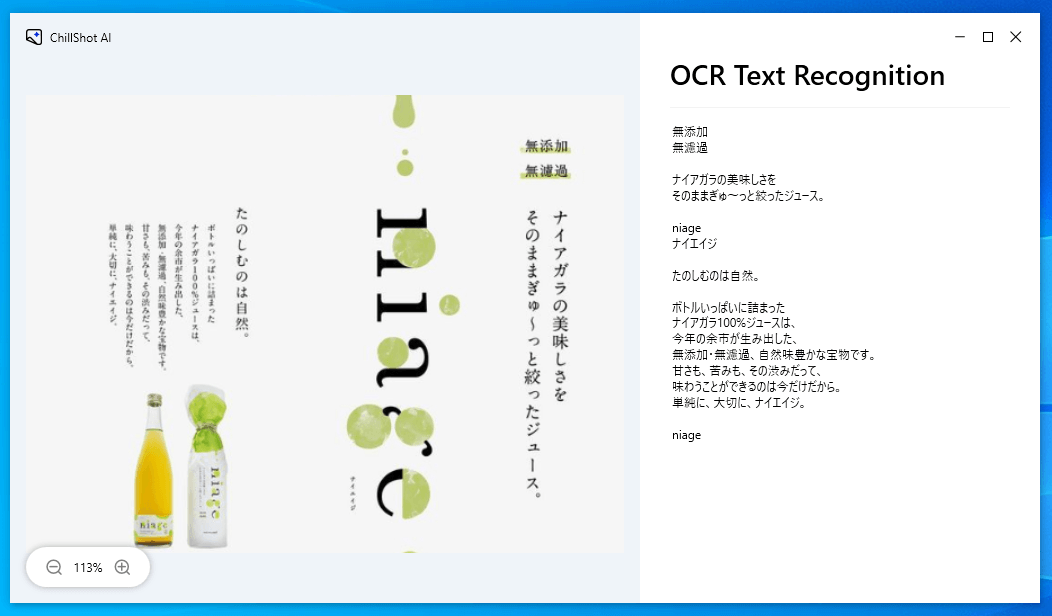
The OCR feature ties into this too. Some situations don't just need translation — they need the text to be selectable so you can copy it, search it, or drop it somewhere else. A screenshot of a Japanese business card, a screenshot of a contract field you need to reference in an email, a screenshot of an app's error code that you want to paste into a support ticket. ChillShot extracts that text accurately enough that I've stopped manually retyping things I screenshot.
Worth knowingThe translation preserves the original layout, so Japanese vertical text, right-to-left scripts, and grid-heavy UI all translate in-place rather than collapsing into a text block. For complex interfaces, that's the difference between understanding the structure and having to guess at it.
The visual Q&A feature gets occasional use in this context too — when the translation gives me the words but I still don't fully understand what a section is asking me to do. Taking a screenshot and asking "what is this form asking for" in plain English bridges the gap between understanding text and understanding intent, which isn't always the same thing.
A Honest Assessment
None of this replaces learning the language, which remains the actual long-term solution if you're spending significant time in a country. And for anything high-stakes — contracts, legal documents, medical information — the translation is a starting point, not a conclusion.
But that's not really the use case. The use case is the hundred small things per week where you're moving through local interfaces and you just need to know what something says well enough to keep going. For that, having it built into your screenshot tool — the thing you're already using for everything else — is meaningfully more convenient than maintaining a separate translation workflow.
Working across countries is genuinely better now than it was five years ago. The translation tax hasn't gone away, but there are more ways to make it smaller. This is one of them.